
Suites
vk suite <dir> runs every *.md in a directory through the
vk ai engine, against one device — local or
remote — or across a whole pool of them:
vk suite tests/ --app com.example.app # local devicevk suite tests/ --app com.example.app --server "$VERIKUN_SERVER" # remote devicevk suite tests/ --app com.example.app --devices emu-5554,emu-5556 # two local devicesSuite time is the sum of its tests on one device, so a suite grows linearly and eventually stops being something you run on every push. See Running across several devices.
How it runs
Section titled “How it runs”- Ordering is lexicographic. Prefix files
01-…,02-…to sequence them.README.mdis skipped — it documents the suite, it is not a test. So is any_-prefixed file: that is a shared fragment other tests@include. (Across a pool, ordering can no longer sequence anything — see below.) - Isolation between tests. With
--app <id>, the app’s data is cleared before each test (pm clear; iOS degrades to a force-stop, since it has no per-app reset). Without--app, make each test self-isolating — start the prose withlaunch <pkg> --clear. - Each test is a full
vk airun — plan cache, self-healing, cost budget, and its own archived JUnit + HTML report under./.verikun/runs/<id>/. A test that fails or errors does not stop the suite; the rest still run. - All
aiflags apply to every test —--model,--max-cost-usd,--timeout, and so on. That makes the spend ceiling per test, not per suite: at the $3 default, a 20-test suite can reach $60.--max-suite-cost-usdadds an aggregate cap on top (off by default) — see Cost & budget. - Preflight is up front. Both the provider (
ANTHROPIC_API_KEY/OPENAI_API_KEY, or thecodex/cursor-agentCLI) and the device toolchain (adb/idbplus a resolvable device) are checked before anything is compiled.
The exit code is the CI gate
Section titled “The exit code is the CI gate”The suite exits non-zero when any test fails, so the CI step needs no result parsing. 1
is a test failure (a regression to investigate); 3 is an environment failure (a machine to
fix); 0 includes flakes that recovered under --retries. The full table:
Exit codes.
Recovering from flakes: --retries
Section titled “Recovering from flakes: --retries”vk suite tests/ --app com.example.app --retries 2A failed test is re-run up to N times. The default is 0 — opt-in, so CI cost and time stay
predictable.
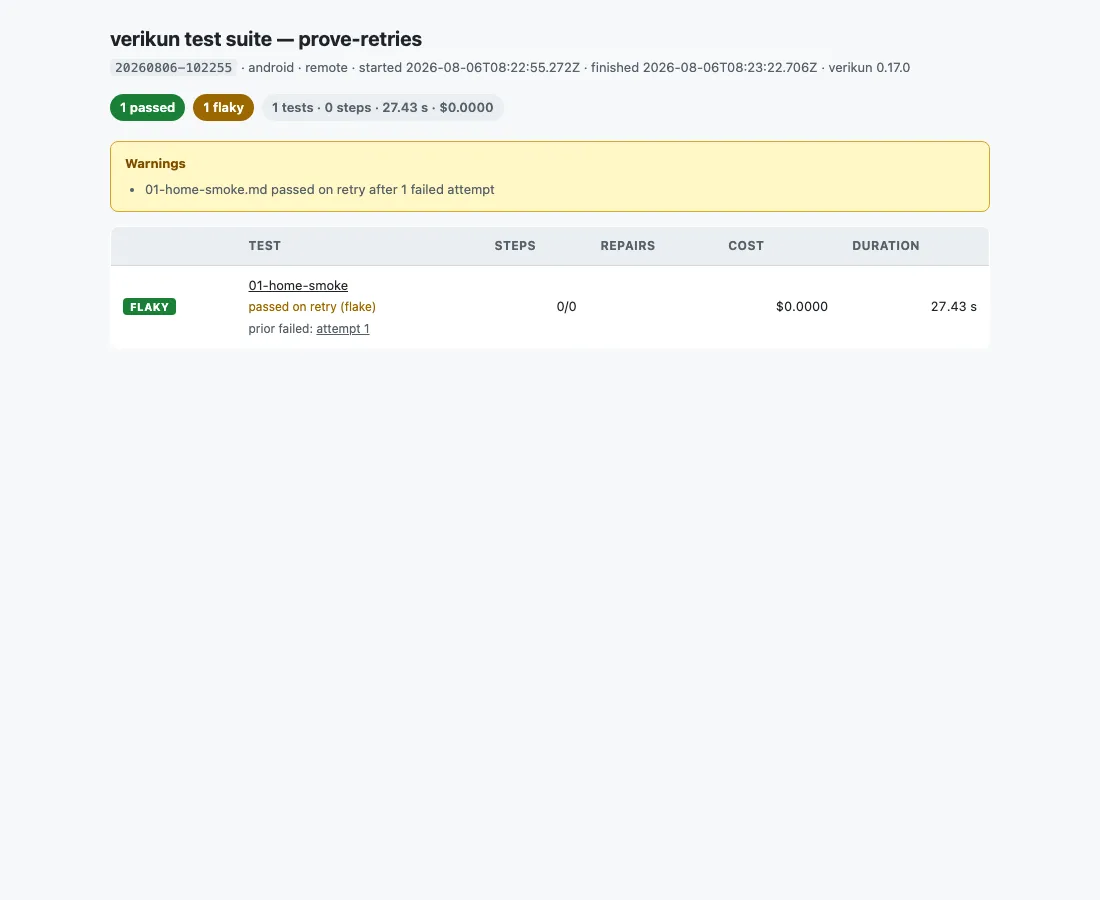
If a later attempt passes, the suite exits 0 and the flake becomes a warning, not a
hard failure. Failed-attempt archives stay linked from the suite overview (attempts on the
test row, plus a warnings list on the manifest), so flakiness stays visible rather than
being papered over. Cost and duration sum across attempts.
What earns a retry
Section titled “What earns a retry”Anything that might come out differently: a flaky selector, a wedged app, and a broken
environment — including a vk server connection dropping mid-suite. Environment retries
wait a little longer each time, and each one lands in warnings, so riding out a wobble is
never silent.
Exactly two failures are never retried, because a rerun cannot change them:
- a budget abort — each attempt gets its own ceiling, so it would just re-abort having spent twice
- a usage error (exit
2) — an unreadable test file, a payload the server refuses
A retry cannot launder a bad compile into a pass: a plan that does not cover its test is never cached, so the retry compiles again.
When a broken environment does stop the suite
Section titled “When a broken environment does stop the suite”If a test dies from an environment error (exit 3 — tool gone, device unplugged, server
unreachable), the toolchain is re-probed, since a transient dump failure also exits 3.
Only if it is still broken and no retries remain does the suite abort, rather than
producing one identical red row per remaining test.
Running across several devices
Section titled “Running across several devices”Point the suite at a pool and it stops being a loop: every device takes the next test the moment it frees up.
# a pool of local devices — named, or every usable onevk suite tests/ --app com.example.app --devices emulator-5554,emulator-5556vk suite tests/ --app com.example.app --devices all-android
# one server that holds several devices — the suite sizes itself from its capacityvk server --devices all --bind 0.0.0.0            # on the device hostvk suite tests/ --app com.example.app --server "$VERIKUN_SERVER"
# several hosts, each with its own server — one lane per device each of them servesvk suite tests/ --app com.example.app --servers http://a:8391,http://b:8391
--devices names devices on this machine, so combining it with --server is a usage
error (exit 2). all / all-android / all-ios mean exactly what they mean for
vk server --devices.
The split is dynamic: a device that draws three short tests simply comes back for a fourth. Wall-clock falls to roughly the length of the slowest single test, so past that point more devices buy nothing.
What changes when you use a pool
Section titled “What changes when you use a pool”- File order no longer sequences anything. Tests must be independent. Longest-first
ordering is taken from the previous run’s
index.json, so cache./.verikun/suitesin CI the way you already cache./.verikun/plans. - Every test is its own process, one per device at a time, with its own active run
directory (
./.verikun/run-<lane>/). - Each row names the device that ran it, in
index.jsonand in the overview table, so “is this device bad, or is this test bad?” is answerable. - A shared
@includefragment is still compiled once on a cold cache, not once per lane: the lanes share one plan cache, so the first to reach a fragment compiles it and the rest wait for its result (they printcompiled by a concurrent run). See the plan cache. - Duration splits in two.
totals.wallClockMsis how long the gate took;totals.durationMskeeps its meaning but is now device-seconds across the pool. --appresets inside the test, on the device that test holds. Known gap: a reset that fails transiently fails the test in parallel where it would be retried serially, and can retire a healthy device (#107).- A device that breaks retires its lane. Its remaining tests move to the others; the suite
aborts (exit
3) only when every device is gone. --ensure-deviceis refused with--devices. Its bare form boots “the one startable device”, which may well be another lane’s emulator — start the pool yourself withvk devices start.- Every lane must share a platform. Running the same suite on Android and iOS is a matrix, which you express by running it twice.
Throttling and budget
Section titled “Throttling and budget”vk suite tests/ --devices emu-1,emu-2,emu-3 --concurrency 2 --max-suite-cost-usd 5--concurrency caps how many devices run at once. More is not monotonically better: three
emulators on one host can thrash it badly enough to produce timeouts that look like test
failures. Separate hosts, or physical devices, deliver the win that stacked emulators do not.
--max-suite-cost-usd stops dequeuing once total model spend crosses it and exits 1 (the box
is fine; the run just did not finish). It is off by default; --max-cost-usd still caps each
test. See Cost & budget for how the two ceilings
interact.
The overview report
Section titled “The overview report”The suite writes to ./.verikun/suites/<id>/:
index.json
Section titled “index.json”A stable, schemaVersioned manifest: per-test pass/fail, steps, model repairs, cost,
duration, and the run id, plus suite totals. Upload and publish steps compose over it (see
the CI guide).
On an abort it also carries aborted: {reason, notRun, kind}; the not-run tests get no rows
and no place in totals, so a skipped test never reads as a regression. kind is
environment (exit 3) or budget (exit 1). Retried flakes add flaky and attempts on
the test row plus suite-level warnings; a parallel suite adds concurrency,
totals.wallClockMs and a per-test device. The full field list:
Reports & test runs.
index.html
Section titled “index.html”A summary page linking every test’s report.html, with a banner naming the not-run tests
when the suite aborted, and a warnings banner when a flake recovered on retry (prior failed
attempts stay linked). A parallel run adds a Device column and reports wall-clock beside
device time.
Where to go next
Section titled “Where to go next”- Remote devices & CI — run a suite from a GitHub Actions runner against a real device
- Reports & test runs — the full
index.jsonand report structure - Exit codes — the complete contract